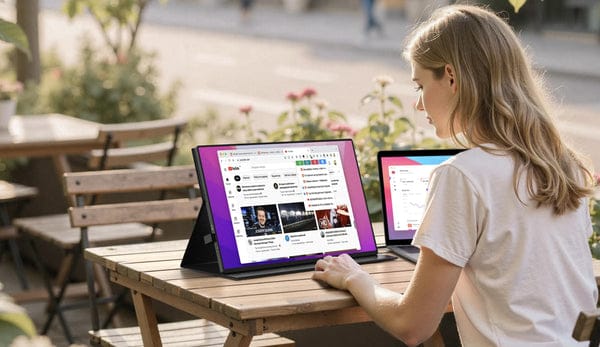
Remote jobs and side hustles are more popular than ever before. Many employees work outside of the office on laptops from coffee shops, coworking spaces, or even while traveling. But while laptops allow you to work from anywhere, there’s one thing they can’t give you more of screen space. A portable monitor is one of the most useful productivity devices for remote workers who want to multi-task and organize their workflows.
Portable displays are beneficial for remote employees who need extra screen space to multi-task and work more efficiently. From easy multitasking to enhanced video meetings, remote workers can work smarter and faster with a portable monitor. In this article, we’ll discuss why remote employees need portable monitors, how touch screen monitors can help you work faster, and what makes newer display technology like the NxtLED™ monitor better than traditional displays.
Why Remote Employees Need Better Computer Setups
Working remotely allows professionals to have a flexible schedule, but that doesn’t make it easy. Trying to use one laptop screen can force remote employees to jump from tab-to-tab, application-to-application, or window-to-window, decreasing productivity levels and creating unnecessary stress.
Remote professionals often do many things at once, like:
-
Video conferencing
-
Checking email
-
Editing documents
-
Data analysis
-
Sending messages across team chat apps
An additional screen allows users to split their tasks and be more efficient with their time. Instead of minimizing and maximizing windows, employees can keep helpful tools open and visible at all times.
Disadvantages of Working on a Laptop Without a Portable Monitor
Working with only the laptop display is not the most convenient option. If you often do several things a day, it is better to use at least one more monitor. Many issues that arise when working on only one screen can be avoided with this simple trick.
One Screen Too Small
The small screen space is the most significant disadvantage of using a laptop without a monitor. When you only have one monitor, you always need to switch between applications, files, or tabs. This breaks concentration and interferes with work, especially if you need to perform research, collect information, write texts, or do something else that is time-consuming.
Diminished Productivity
If you often work with several tools, documents, or windows simultaneously, having only one display becomes annoying. Checking e-mails while working, comparing documents, using data from another window, and so on become a real hassle, since you always need to change tabs. As a result, your productivity may diminish, and it will take you much longer to finish the work.
Eye Strain
Working on a small display for many hours is also not the best option. To read the information, you often have to zoom in or focus on the screen, which can lead to eye fatigue. If you do not have an additional display, the work may become very frustrating over time.
Does Not Fit All Types of Workflows
There are types of work that naturally go well with two or more displays. If you are a designer, a programmer, a trader, a writer, or a video editor, you most likely have to use several tools or windows at the same time. A single laptop screen may not be enough for all of them, which can feel very inconvenient.
Difficulties in Organizing the Work Space
Organizing the work space on only one display is also not very simple, since the window with the information may often hide behind other programs. This can be especially frustrating if you are following a conversation, a file, or a task that is currently being done.
Benefits of Portable Monitors
Portable monitors can help remote employees boost productivity in a variety of ways. Here are the major benefits of using portable monitors as a remote worker or professional.
1. Increased Productivity
When working remotely, productivity is key. Having a portable monitor allows employees to spread out their work and create an organized workspace.
Having two screens or more allows users to:
-
Place their email client on one screen
-
Have a document open on another screen
-
Join a video meeting
Multi-screen workflows allow remote employees to see more at once without having to switch tabs. Some studies show that productivity can increase by as much as 30% when working with two monitors.
2. Enhanced Multitasking
As a remote employee, you’re likely handling many tasks. Having a portable monitor gives you the ability to multi-task without any distractions.
Examples of how remote employees can benefit from secondary monitors:
-
Software developers can have code open on one screen while keeping testing software visible on another
-
Digital marketers can have live analytics visible while managing campaigns
-
Content writers can have research opened on one screen while drafting on the other
3. Improved Video Meetings
Video meetings are typical for remote employees and having a second screen can drastically improve your meeting experience. Portable monitors allow you to:
-
Keep your meeting application open on one screen
-
Take notes on your computer
-
Have documents up during presentations
4. Touch Screens Allow for Faster Workflows
Many portable monitors come with touchscreen monitor capabilities. Touch screen monitor allow users to interact with their apps through finger gestures.
Touch screens allow for:
-
Quicker navigation
-
Easy editing for designers
-
Efficient collaboration during presentations
-
Video and photo editors also benefit from using touch screen monitors.
5. Easily Increase Your Screen Space Anywhere
Traditional computer monitors are extremely bulky and inconvenient for remote employees to take with them on the go. Portable monitors are designed with mobility in mind.
Remote employees can pack portable monitors into their laptop bag and take them from their living room to their living abroad.
Ideal for:
-
Digital nomads
-
Freelance workers
-
Consultants
-
Part-time remote employees
6. Improved Viewing Angles = Better Ergonomics
Staring at a small laptop screen for hours can be detrimental to your eyes. Not only will your eyes hurt, but working from a laptop for long periods of time can cause you to not sit up straight.
Portable monitors allow remote employees to:
-
Move their computer screen to where they want it
-
Gain more screen area
-
Sit up straighter
Plus, advanced displays like the NxtLED™ monitor offer better brightness options. Newer displays allow you to work longer without fatiguing your eyes.
FAQs
1. What does a portable monitor do?
Portable monitors act as a second screen to your laptop, tablet, or smartphone. They increase productivity and help users multi-task without stressing about switching back and forth.
2. Should I get a portable monitor for remote work?
Yes! If you’re looking to spread out your work and increase productivity, getting a portable monitor is a great option. Remote employees can see more on their screens at once without having to constantly switch windows.
3. What is a touchscreen monitor?
Touch screen monitors allow users to interact with their computer by using their finger or a stylus to tap directly on the screen. Touch screen monitors allow for faster navigation and efficiency.
4. What makes the NxtLED™ monitor different?
Our NxtLED™ monitors offer a newer display technology that outperforms many standard computer monitors. NxtLED™ monitors give you better brightness, allowing you to see more vivid colors and brighter whites.
5. Can I use a portable monitor with my smartphone?
Yes! Most portable monitors support smartphones through USB-C ports. You can hook your smartphone up to your portable monitor to increase your phone’s display for productivity or entertainment.
Remote Workers Should Get a Portable Monitor
Remote professionals can benefit from the use of a portable monitor. Whether you’re a freelancer working on a laptop or a remote employee at home, portable monitors help increase productivity and improve workflows.
Portable monitors allow users to see more at once without having to switch back and forth from tab-to-tab. Boost your productivity and add a portable monitor to your tech stack today!